Mom lives alone?
Know she’s OK every morning.

ViYomi is an app with one button. Mom presses it in the morning, and if the press doesn’t come, you get a message. No cameras, no tracking, and no asking “Is everything OK?” every single day.

For Android. A free version for one contact.

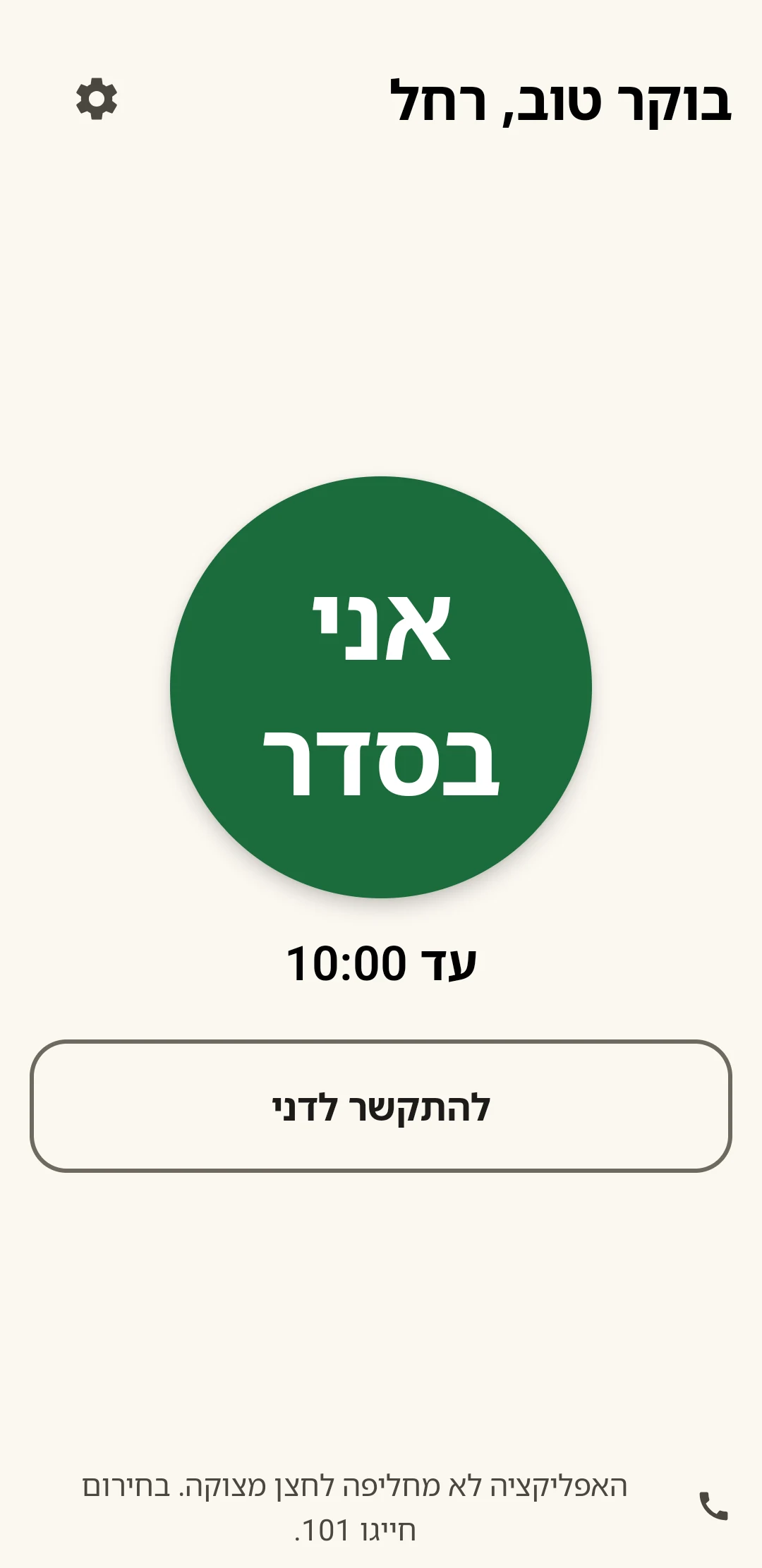
ViYomi’s main screen, in Hebrew: “Good morning, Rachel” and a big green “I’m OK” button

One button, once a day.

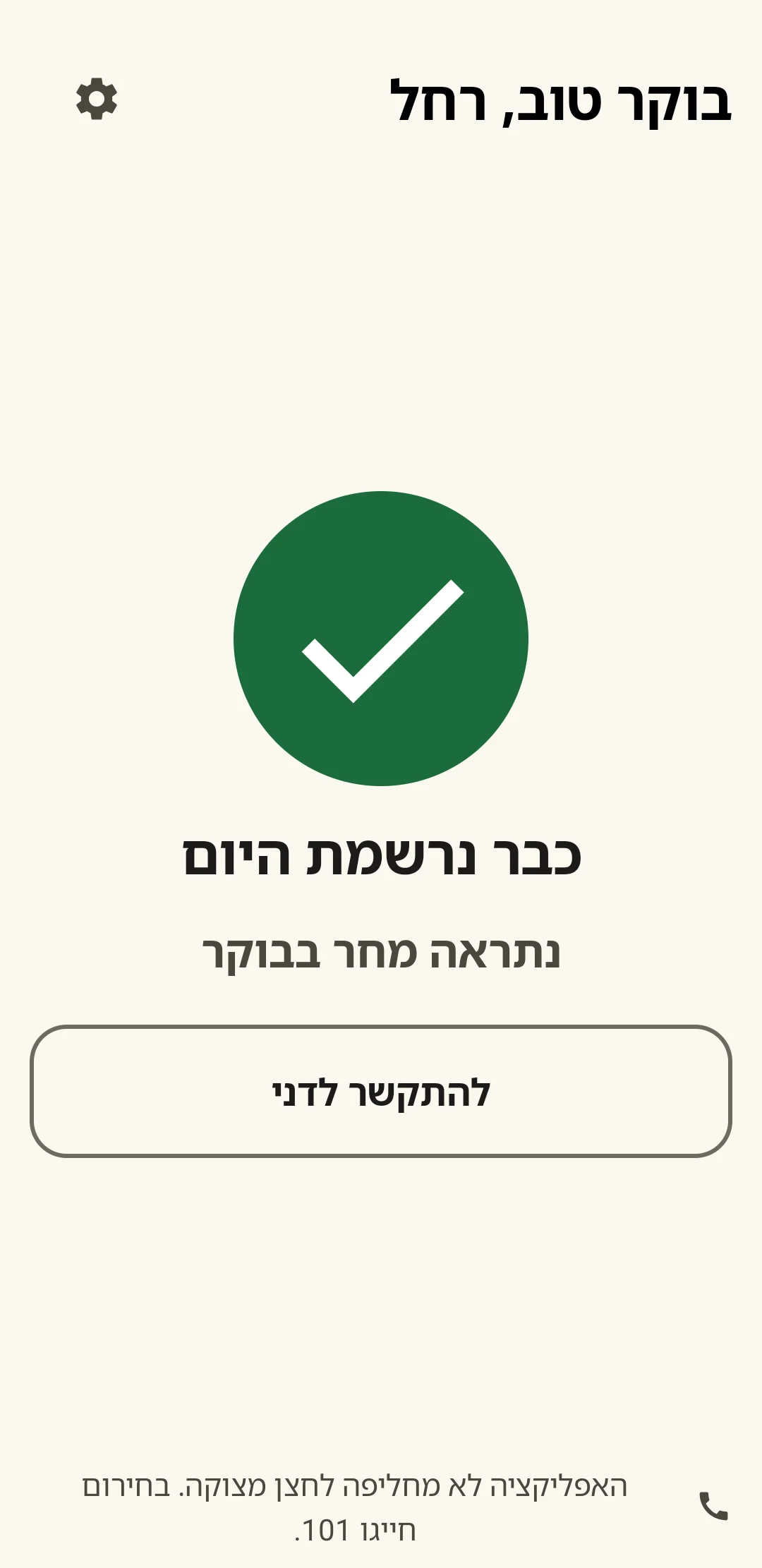
No menus and no passwords. Open it, press, and that’s it. After the press, a big check mark appears, and the day is done.

  • A huge button, and text that grows with the phone’s settings
  • Works on an old or basic Android phone, too
  • Speaks Hebrew, Russian and Arabic
Before the press: the “I’m OK” button, with “by 10:00” under it
In the morning
After the press: a big green check mark, “Already checked in today, see you tomorrow morning”
Checked in. Today’s done.
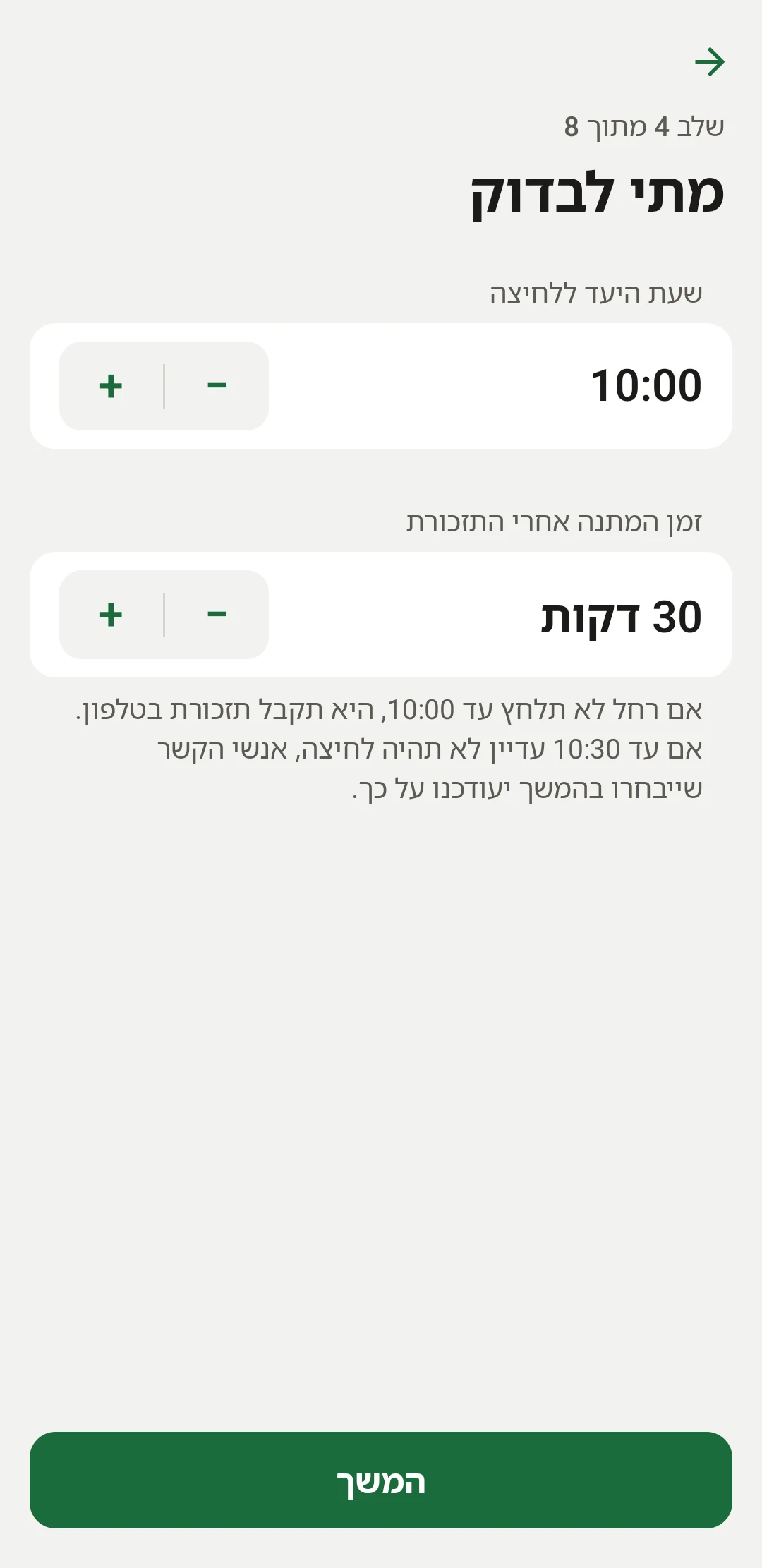
The setup screen: press by 10:00, and a 30-minute wait after the reminder

No press? A reminder, then a message to the family.

You set the press-by time and the wait once, during setup. From then on, it all happens on its own.

  1. By 10:00 Mom presses “I’m OK”. Most days, that’s it, and nobody gets any message.
  2. 10:00 Forgot? Her phone reminds her. A reminder that rings, with a button she can press right from the notification.
  3. 10:30 Still no press? You’ll know. All the contacts get a message, so that someone calls her.
The message you’d get, only on a day like that:
וי יומי: רחל עוד לא לחצה היום "אני בסדר". היא הייתה אמורה ללחוץ עד השעה 10:00, וקיבלה תזכורת. כדאי שמישהו יתקשר אליה. ViYomi: Rachel has not pressed "I'm OK" today. She was supposed to press by 10:00, and she received a reminder. Someone should call her.

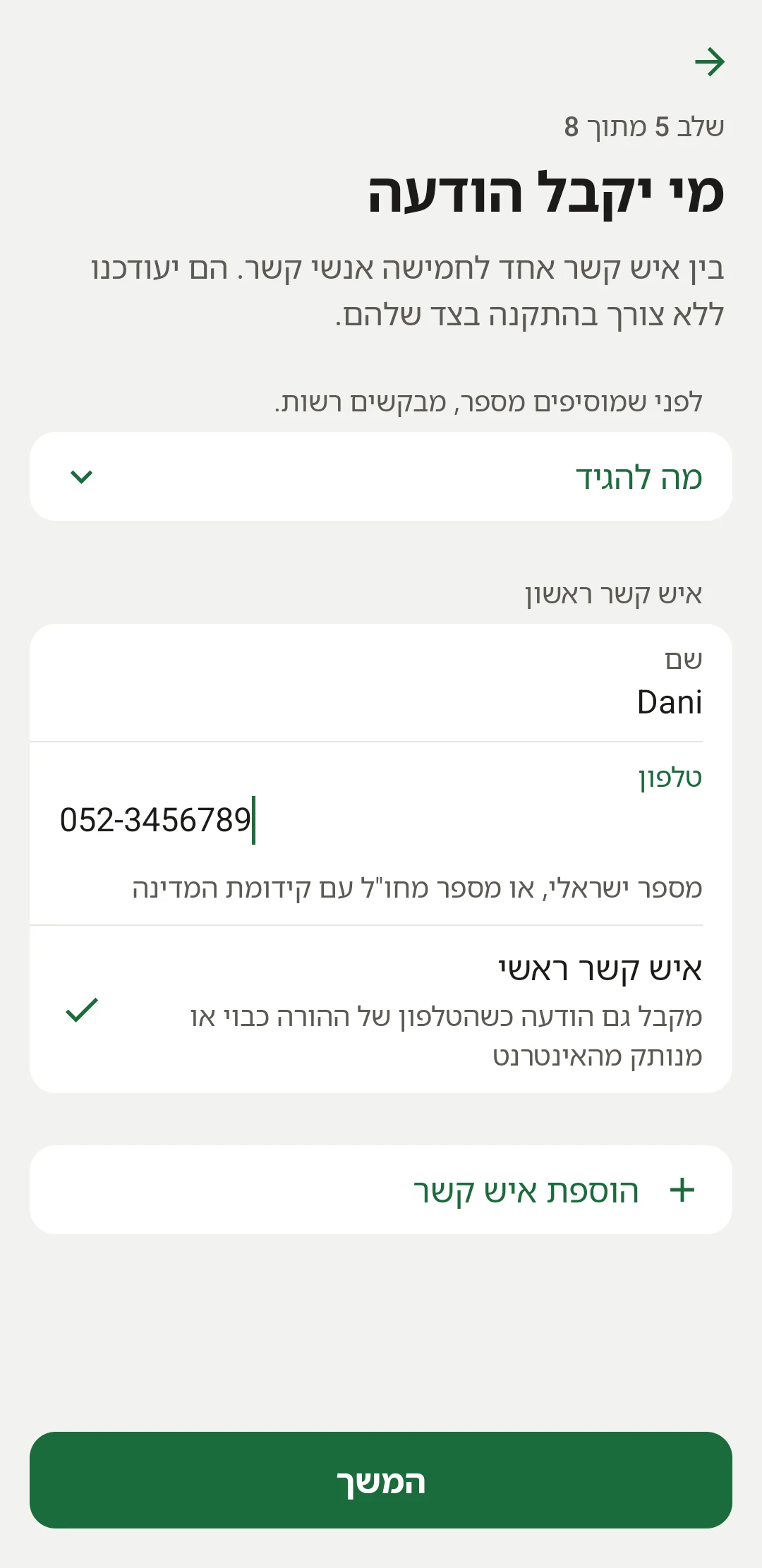
Up to five contacts, and they install nothing.

The siblings, the grandchildren, the daughter who lives abroad. ViYomi is installed only on Mom’s phone, and everyone else simply gets a message when it’s needed. And if she presses later, everyone gets a message that all is well.

Each of them chooses how to get the message:
  • SMS
  • Voice call
  • WhatsApp
Voice calls and WhatsApp come with the paid version.
The contacts screen: one to five contacts, kept informed without installing anything

Service messages only. Never marketing.

Every message is a service message about one specific parent. There is no marketing, no promotions and nothing that is sent on a schedule for its own sake. A family sees at most one alert per day, and on most days no message at all.

How a phone number gets on the list

Recipients do not sign up themselves. While setting the app up on the parent’s phone, a family member asks each relative for permission and enters a name and number only after they agree. The app reminds them to ask and offers the words to use (the consent script).

Each number then receives one message saying which parent it is about and what they will receive, with a link to stop. The link keeps working for as long as the number is on the list.

How to stop receiving messages

Open the link in the first message. It shows a confirmation page, and the number is removed as soon as the recipient confirms there. Removal is immediate and needs no phone call and no account. The confirmation step exists so that automatic link scanners cannot remove someone by accident.

If that first message is gone, email viyomi@app4everyone.com. A number in the US or Canada can also reply STOP to any message.

Questions about a message you received, or a request to be removed, are answered at the same address.

What the messages look like

Messages are sent in Hebrew. English translations are shown here for readers who do not read Hebrew.

The first message, as soon as the number is added:
וי יומי: הוגדרת לקבל עדכונים על רחל. אם רחל לא תלחץ בבוקר "אני בסדר", תישלח אליך הודעה כאן.

מידע על השירות: viyomi.app4everyone.com

להסרה: https://viyomi.app4everyone.com/o/…
ViYomi: You have been set up to receive updates about Rachel. If Rachel does not press "I'm OK" in the morning, a message will be sent to you here.

About the service: viyomi.app4everyone.com

To stop: https://viyomi.app4everyone.com/o/…
An alert, only on a day with no press:
וי יומי: רחל עוד לא לחצה היום "אני בסדר". היא הייתה אמורה ללחוץ עד השעה 10:00, וקיבלה תזכורת. כדאי שמישהו יתקשר אליה. ViYomi: Rachel has not pressed "I'm OK" today. She was supposed to press by 10:00, and she received a reminder. Someone should call her.
When she presses after an alert:
וי יומי: רחל לחצה עכשיו "אני בסדר" (10:47). הכל בסדר. ViYomi: Rachel pressed "I'm OK" just now (10:47). All is well.

Privacy in one paragraph

ViYomi stores the family’s settings, the daily press and a log of the messages it sent. It has no location tracking, no microphone, no camera and no access to the phone’s contact list, and it does not sell data to anyone. Day records and the message log are deleted after 90 days, and the app’s settings include deleting everything. The full text is in the privacy policy.

A few more things we thought about.

Skip Shabbat and holidays, if you want

No reminders and no messages, by the Shabbat times of the city you picked.

Pause until a date

A trip, a stay at your place, or a hospital stay? Pause it, and the check comes back on its own.

Call with one tap

From the main screen, Mom can call her main contact without searching.

No cameras, no tracking

No location, no microphone and no access to the phone’s contacts. Privacy policy

Start for free.

Mom’s reminders are never limited, in either version.

Free ₪0

One contact, messages by SMS, and up to two alerts a month.

Join the beta
For the whole family ₪19a month, per family

Up to five contacts, messages by SMS, voice call or WhatsApp, and no limit on the number of alerts. You can cancel at any time.

You pay in the app, through Google Play, or on the website, where any of the contacts can pay for Mom.

Go to the payment page

Tomorrow morning, one press. And you can relax.

Join the beta

ViYomi does not replace an emergency button or emergency services. In an emergency in Israel, call 101; elsewhere, call your local emergency number.